원문
http://michaelcrump.net/fixing-a-broken-toolbox-in-visual-studio-2010-sp1
어느날부터, visual studio를 실행하면 환경설정같은 비스무례한걸 하는지 모래시계가 상단시간동안 지속되어서 짜증이 났었다.
그냥 그러려니 했었는데, 주말을 맞아 원인이 멀까 찾아보니 해답이 있었다.
원인은 toolbox componet중에 먼가 깨진것이 였다.
위 링크의 해결책대로 하니 정말로, 해결이 되었다.
이젠, 바로바로 뜨고 사용할 수 있다. ㅋㅋㅋ
혹시 링크가 없어질지 몰라서, 원문을 아래에 놓습니다.
두번째 링크에 하신분은, 제거만 하고 SP1을 다시 설치했다는말이 없어서...
그건, 여러분이 알아서 하시길... SP1설치는 오래 걸리니....
Fixing a broken toolbox (In Visual Studio 2010 SP1)

I was recently running into a situation where every time I opened Visual Studio 2010 SP1, the following message would appear for about 60 seconds or so:
"Loading toolbox content from package Microsoft.VisualStudio.IDE.Toolbox.ControlInstaller.ToolboxInstallerPackage
'{2C98B35-07DA-45F1-96A3-BE55D91C8D7A}'"
After finally get fed up with the issue, I started researching it and decided that I’d share the steps that I took to resolve it below:
- I first made a complete backup of my registry.
- I then removed the following key:
[HKEY_LOCAL_MACHINE\SOFTWARE\Wow6432Node\Microsoft\VisualStudio\10.0\Packages\{2c298b35-07da-45f1-96a3-be55d91c8d7a}] - I went to the following directory: C:\Users\Your Name Here\AppData\Local\Microsoft\VisualStudio\10.0\ and created a folder called bk and moved the .tbd files to that folder (they are hidden so you will have to show all files). I then removed the .tbd files in the root directory.
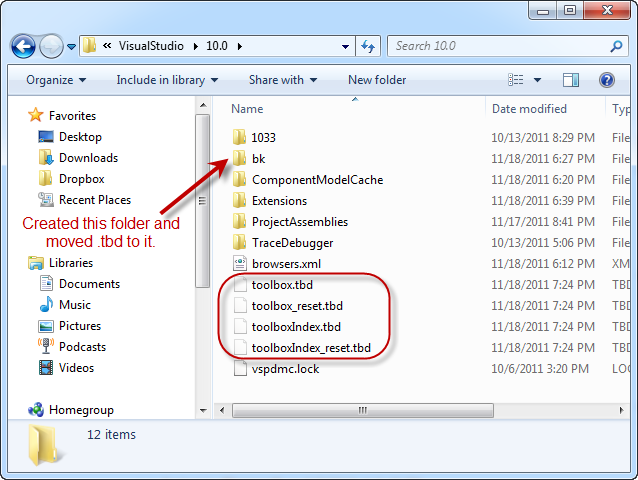
- I then launched Visual Studio 2010 SP1 again and it recreated those files and the problem was gone.
Anyways, I hope this helps someone with a similar problem. I created this blog partially for myself but it is always nice to help my fellow developer.
Thanks for reading.
'development' 카테고리의 다른 글
| [Drone] Phantom4 개발 셋팅 (0) | 2016.11.16 |
|---|---|
| windbg 환경셋팅. (0) | 2014.11.04 |
| 3개의 점을 이용하여 타원만들기. (0) | 2014.05.15 |
| Qt library 삭제. (0) | 2014.03.20 |
| QT compile in windows (0) | 2014.03.19 |